

"Looking for the best POS system for your small business? This guide covers cloud-based and mobile POS system features, costs, and how to choose the right one. Includes honest Bseech POS review."
If you run a small business, you've probably heard the term "POS system" thrown around. Maybe you've even thought: "I already have a cash register. Why do I need a POS?"
That's a fair question.
The short answer is that a cash register is a tool for taking money. A modern point of sale system is the operational center of your retail business. It tracks what's selling and what's sitting, tells you which customers are worth keeping, flags inventory problems before they become stockouts, and connects your physical store to wherever else your customers want to buy from you.
Most small retailers use their POS for transactions and nothing else. That leaves the most valuable parts, inventory intelligence, customer data, and business analytics sitting idle. Using your POS fully is one of the highest-ROI changes a small retailer can make, and it doesn't require new software.
In this guide, I'll break down exactly what a modern POS system does, why it matters for your business, and how to choose the right one. By the end, you'll know whether you need to upgrade, and what to look for when you do.
Part 1: What Is a POS System, Really?
A point-of-sale system is the hardware and software that lets your business process transactions. But that definition sells it short.
Going beyond cash, modern point of sale systems accept many types of payments, credit, debit, EBT, mobile wallets like Apple Pay and Google Pay. They're payment processing software that helps with data reporting, loyalty programs, and inventory management .
Think of it this way:
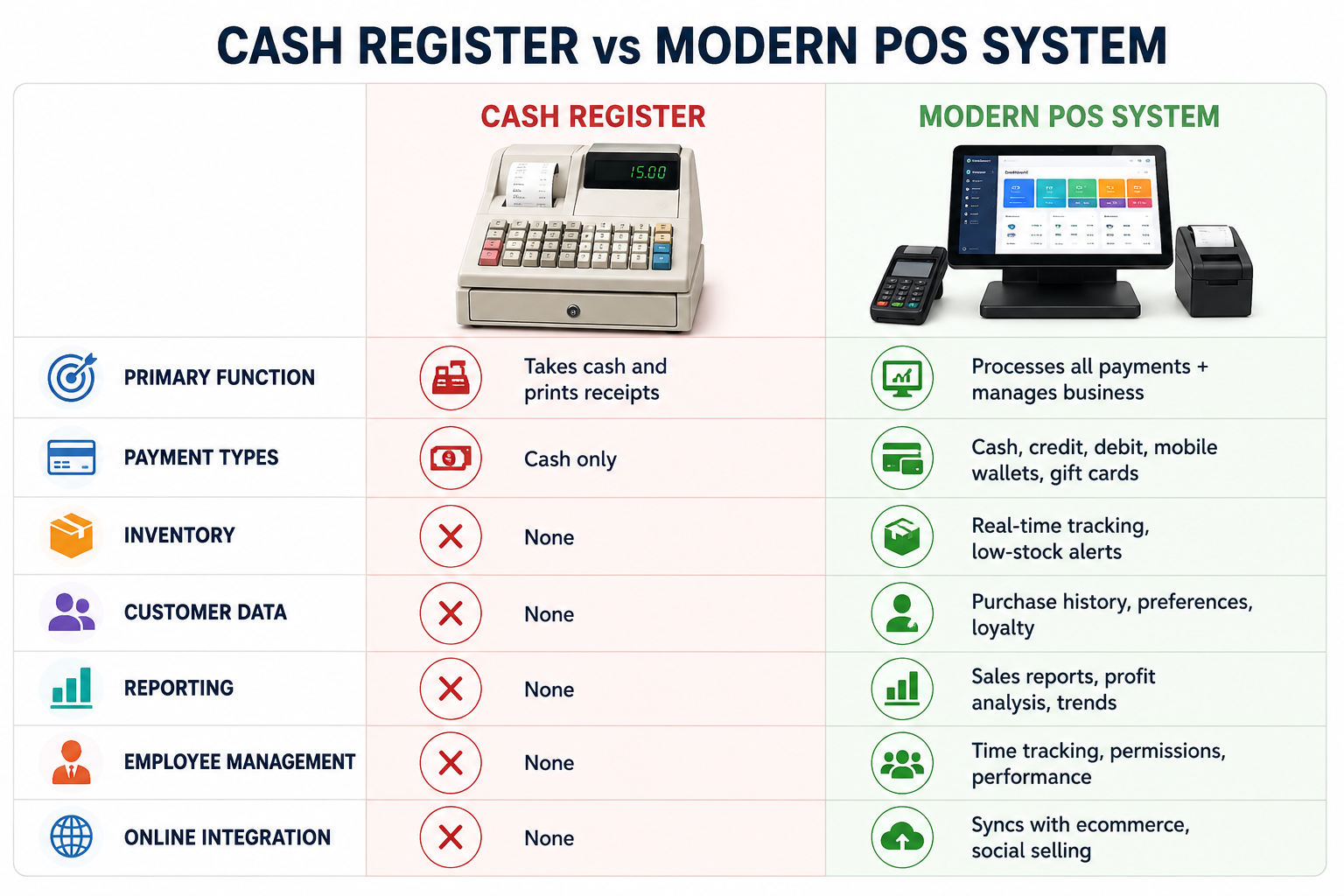 POS compare
The key takeaway: If your "POS" is just a cash register, you're leaving money on the table.
Part 2: Why Small Businesses Need a POS System
Let's get specific. Here are the four most important benefits of upgrading to a modern POS system.
1. Inventory Management That Actually Works
This is the feature that pays for itself.
Modern POS systems track inventory in real time. When you sell an item, the system deducts it from your stock immediately. When stock hits a low threshold, you get an alert.
What this means for you: You stop running out of fast-moving items because you didn't notice they were almost gone. You stop over-ordering slow movers because you weren't watching the aging data. Neither of these is an inventory problem as much as a visibility problem, and your POS solves it.
Most systems let you set reorder points for every item in your catalog. When stock hits that threshold, the system flags it, or, in more advanced configurations, generates a purchase order automatically.
Quick wins with a POS:
- Set reorder points for your top 20 fastest-moving items
- Run an inventory aging report monthly to identify slow movers
- Use purchase order automation to remove manual reorder steps
2. Customer Data You Can Actually Use
Every transaction is a customer data point, and most retailers never leverage this fact.
The customer who comes in every other Saturday, always buys in the same category, and hasn't been in for six weeks, your POS knows about that gap.
Customer records tied to transactions let you see:
- Purchase history
- Visit frequency
- Average spend
- Product preferences
That information powers loyalty programs that actually work. It enables targeted promotions that feel relevant instead of generic. It makes follow-ups that bring customers back before they've fully drifted away.
What this means for you: You don't need a sophisticated CRM to do this. You need a POS that records customer details at checkout and a habit of looking at the data it generates. Start with one simple question: Who were my top 20 customers last quarter, and when did each of them last visit? The answer will tell you where to focus your attention.
3. Sales and Performance Reporting
This is where the POS becomes a decision-making tool.
The best POS systems don't just record transactions, they use that data to create actionable reports. You can see:
- What's selling and what's sitting
- Peak hours and seasonal trends
- Profit margins by product and category
- Staff performance (if employees have individual logins)
What this means for you: Better business decisions. You can craft timely promotions based on actual data. You can predict staffing needs. You can identify locations that need support or teams that need additional training.
4. Omnichannel Capability
This is one of the most underdeveloped capabilities in small retail.
A customer who discovers your boutique on a Saturday might try to find your products online on a Monday. If there's no online presence, or if the online inventory doesn't match what's actually in stock, you've lost that sale.
Modern POS platforms connect directly to ecommerce storefronts and sync inventory in real time. When you sell an item in the store, it comes off the online listing. When you sell it online, it comes off the in-store count.
What this means for you: That sync eliminates overselling, reduces manual reconciliation, and critically extends your selling hours without extending your working hours.
For small retailers who've been hesitant about ecommerce because of the complexity, the good news is that setup has gotten dramatically simpler. Many current POS systems let you stand up a basic online store in a matter of hours, pulling product information and images directly from your existing catalog.
Part 3: Key Features of a Modern POS System
Not all POS systems are created equal. Here are the features that actually matter.
Payment Processing
Modern POS software accepts most, if not all, common payment methods your customers might prefer:
- Debit and credit cards (EMV chip)
- Contactless payments (tap-to-pay)
- Mobile wallets (Apple Pay, Google Pay)
- Gift cards
- Cash
- Online orders
Why it matters: Customers expect choice. If you can't take their preferred payment method, you lose the sale.
Inventory Management
Look for these inventory capabilities:
- Real-time stock tracking
- Automated low-stock alerts
- Reorder point management
- Multi-location inventory transfers
- Product performance tracking
- Supplier and purchase order management
Customer Relationship Features
A strong POS system captures:
- Customer purchase history and preferences
- Loyalty program integration with points tracking
- Targeted promotions based on buying patterns
- Customer segmentation for personalized marketing
- Gift card and store credit management
Employee Management and Security
This is often overlooked but critical:
- Role-based access controls and permissions (cashiers shouldn't have the same permissions as managers)
- Individual employee logins for accountability
- Time tracking
- Detailed audit trails
Why it matters: Security. Employee accounts with proper permissions protect your business data and prevent unauthorized refunds, inventory adjustments, or reporting access.
Reporting and Analytics
Look for:
- Real-time sales dashboards
- Customizable reports for different business needs
- Profit margin analysis by product and category
- Peak hours and seasonal trend identification
- Tax reporting and compliance tools
Cloud Accessibility
This is becoming the standard:
- Monitor operations remotely from any device
- Automatic backups protect against data loss
- Software updates deploy without manual intervention
- Offline mode for uninterrupted operations during internet outages
Hardware Considerations
Most POS systems require some hardware. Here's what you might need:
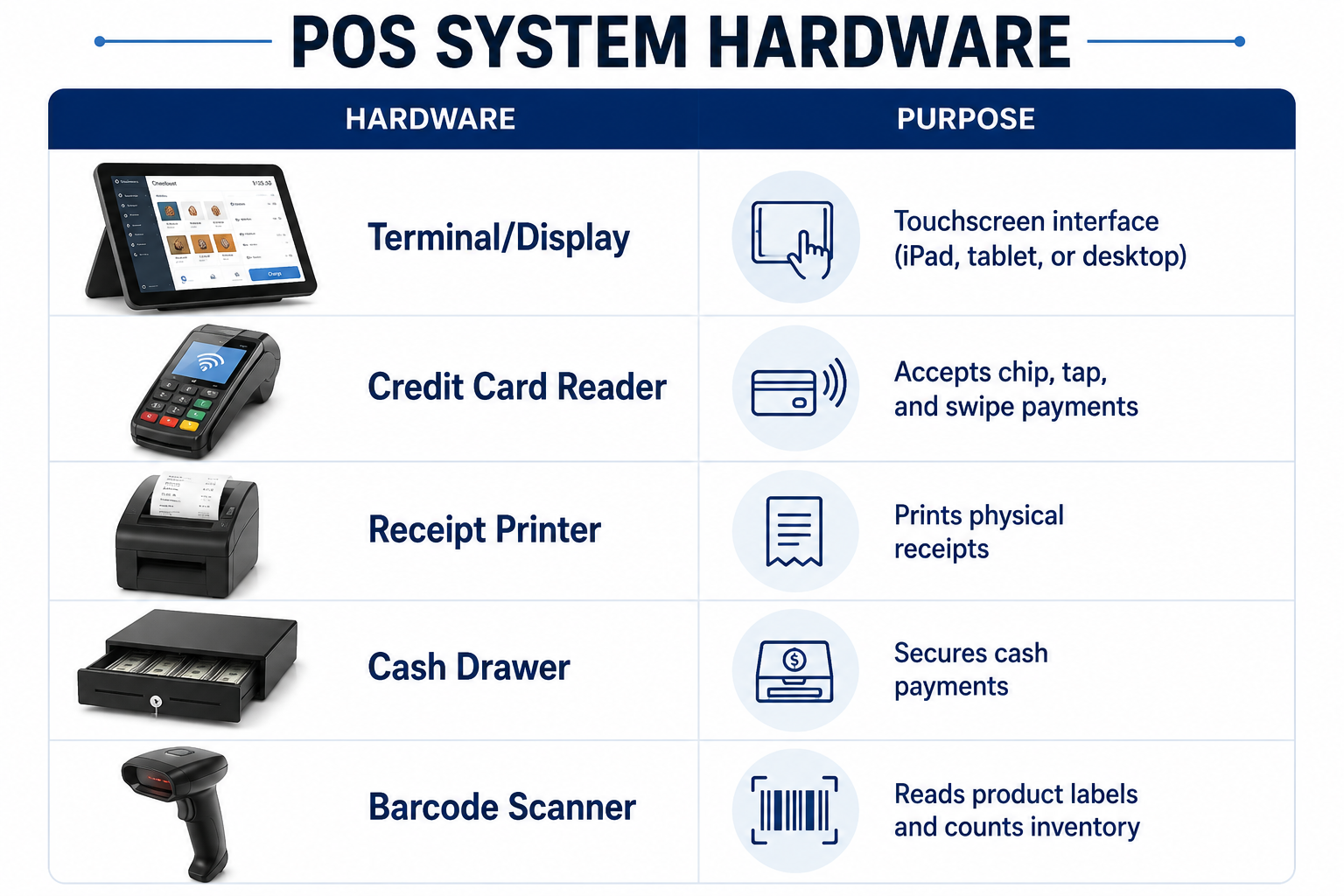
The key question: Do you want a fixed countertop setup or a mobile POS (mPOS) that runs on a smartphone or tablet?
Part 4: How to Choose the Right POS System
Here's a practical framework for making the right choice.
Step 1: Know Your Business Type
Different industries need different POS features:
- Retail stores prioritize inventory tracking and sales analytics
- Restaurants need floor plans, recipe costing, and kitchen displays
- Service providers need appointment scheduling and client management
Choose a system that's purpose-built for your industry. Features and tools reflect how employees do everyday tasks, helping them work faster.
Step 2: Check the Pricing Carefully
POS pricing varies wildly. Here's what to watch for:
Monthly subscription fees: Most systems use a SaaS model. You pay a monthly fee for access to the software and ongoing support. Plans can start anywhere from $59 to $169+ per month depending on features and terminals.
Processing fees: Almost all POS systems charge transaction fees. These are typically around 2.49% + 15cents for card payments, though rates vary.
Hardware costs: Hardware ranges from free (magstripe reader) to $800+ for a full countertop station. Buy your hardware outright whenever possible. Leasing sounds attractive because it lowers upfront costs, but the total cost over a 36-month lease almost always exceeds the purchase price sometimes by 30 to 40 percent.
Contracts: Some providers require 24- or 36-month contracts with early termination fees. Others operate month-to-month. Read before you sign.
Step 3: Consider Offline Mode
This is a critical question: What happens when the internet goes down?
Cloud-based POS systems depend on internet connectivity. A Wi-Fi outage during peak hours can stop your business cold. Look for a system that offers offline mode processing payments and syncing once connectivity returns.
Step 4: Ask About Data Ownership
Your POS system accumulates valuable data things like customer profiles, purchase histories, inventory records, and financial reports. If you decide to switch providers later, you need to know whether you can export that data and in what formats.
Test the export process before you commit. Download a sample report and verify that the data you need is actually portable. Switching POS providers is already disruptive, losing your historical data makes it dramatically worse.
Step 5: Test Support
Look at what reviewers actually complain about. Processing rate increases, contract lock-in, support response times, and hidden fees are the patterns that predict your experience better than an aggregate star rating.
A 4.5-star system with consistent complaints about support will frustrate you more than a 4.0-star system with responsive help when things break on a Friday night.
Part 5: POS Options What's Out There
Here's a quick overview of popular POS options and where they shine.
Cloud-Based POS Systems
These are the most common for small to medium businesses. They run on remote servers, update automatically, and allow owners to access dashboards from any device.
Best for: Most small businesses. They offer the best balance of features, cost, and scalability.
Mobile POS (mPOS)
Mobile POS systems don't require stationary software and hardware that is bound to one place. They attach to mobile devices like smartphones or tablets.
Advantages :
- Move to the cloud for better security and accessibility
- Stay mobile take your food truck or craft booth on the road
- Reduce costs with simpler equipment
- Dramatically increase ease of use with a familiar mobile app
Best for: Pop-ups, food trucks, craft markets, and businesses that need to sell from anywhere.
Open-Source POS Systems
Some businesses choose open-source POS solutions. These are typically free, offline-first, and highly customizable, but they require technical expertise to set up and maintain
.
Best for: Technically savvy business owners who want full control and zero monthly fees.
Frequently Asked Questions
Is a POS system really necessary for a small business?
Modern POS systems do far more than process payments. They manage inventory, track customer data, generate reports, and integrate with online sales. If you're still using a cash register, you're missing out on data that could help you make better business decisions.
How much does a POS system cost?
Costs vary widely. Monthly subscription fees start around $59 and go up from there. Hardware can cost anywhere from $0 for a basic card reader to $800+ for a full terminal. Processing fees typically add 2.5-3% per transaction. Always check for contracts and renewal pricing.
What happens if my internet goes down?
Some POS systems like Bseech POS have offline mode, allowing you to continue processing payments. When connectivity returns, the system syncs automatically. This is an important question to ask before choosing a provider.
Can I sell online with my POS system?
Yes. Many modern POS platforms connect directly to ecommerce storefronts and sync inventory in real time. When you sell an item in the store, it comes off the online listing. When you sell it online, it comes off the in-store count. This eliminates overselling and manual reconciliation.
What hardware do I need?
Core hardware includes a terminal/display, credit card reader, receipt printer, and cash drawer. A barcode scanner is also common. The exact setup depends on whether you choose a countertop terminal or a mobile POS.
How do I choose the right POS system?
Start by understanding your business type. Retail stores need strong inventory tracking; restaurants need different features. Check pricing carefully, look at the total cost including hardware, subscription, and processing fees. Test support before committing. And always ask about data export and contract terms.
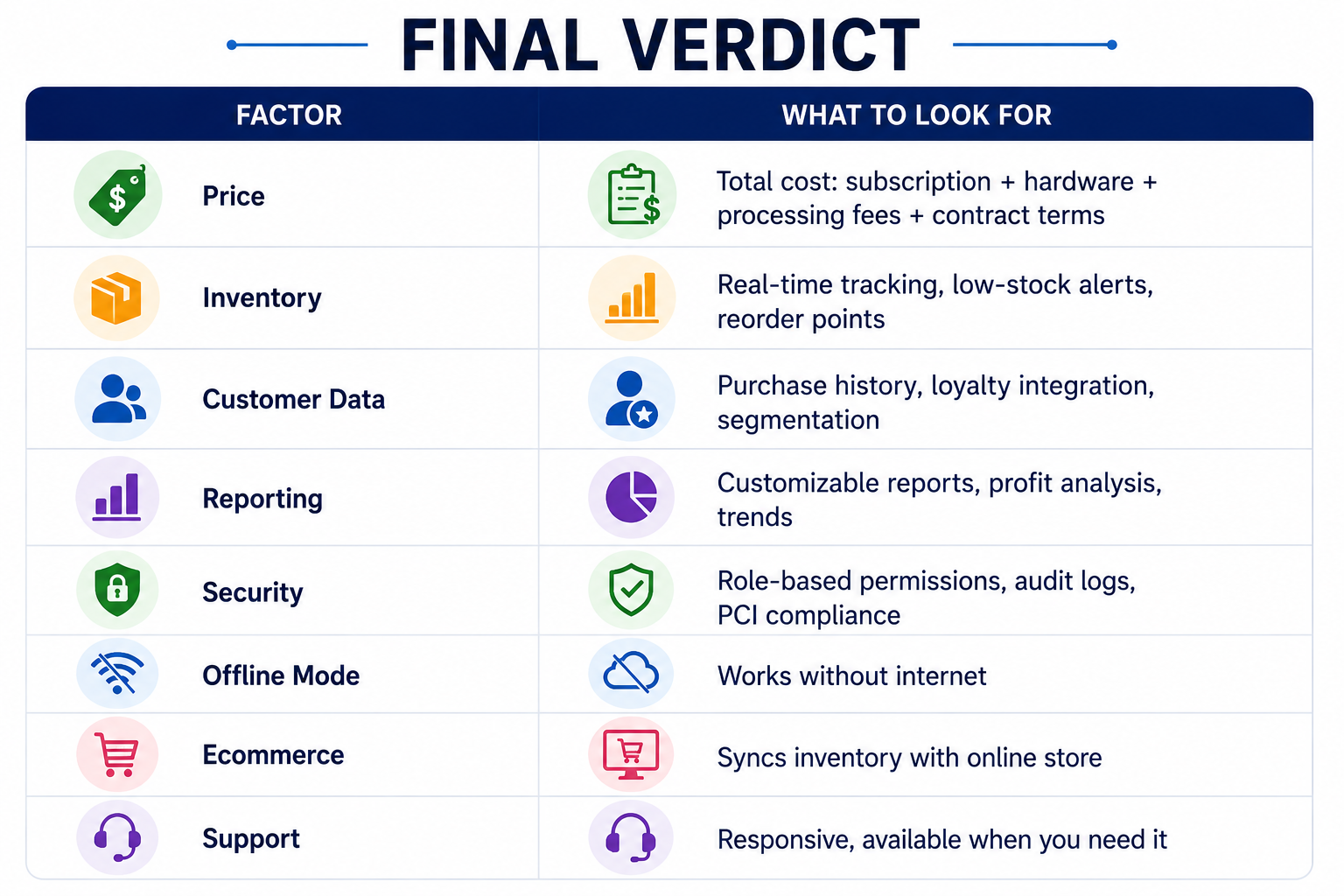
Your POS system is more than a cash register. It's the brain of your retail business. Used fully, it tracks what's selling, tells you which customers are worth keeping, flags inventory problems before they become emergencies, and connects your physical store to your online presence.
If you're still using a cash register, upgrading is one of the highest-ROI changes you can make.
Explore the full-featured Bseech POS system
Disclosure: Some links in this article are affiliate links. We may earn a small commission at no extra cost to you. We only recommend products I've personally researched and believe bring value to my readers. Bseech POS is one of those products.



Be the first to leave a comment.