

Introduction: Why This Guide Exists
If you're reading this, you're probably feeling overwhelmed.
You've seen the ads. "Unlimited bandwidth!" "99.9% uptime guarantee!" "Free domain!" But when you actually try to compare hosts, the pricing feels intentionally confusing. The "per month" price you see on the homepage almost never matches what you actually pay.
Here's the truth: there is no single "best" web host. The right host depends entirely on your technical comfort level, your budget, and what you actually need your website to do.
This guide exists to cut through the marketing fluff. I'll explain:
- The different types of hosting (and which is actually right for you)
- What features actually matter (and which are just marketing)
- How to spot hidden costs and renewal traps
- How A2 Hosting fits into the picture, where it excels, and where other hosts might be a better fit
By the end, you'll know exactly what to look for and which questions to ask before you sign up for anything.
Part 1: Understanding the Different Types of Web Hosting
Before you can choose a host, you need to understand what kind of hosting you actually need. Here are the main options:
Shared Hosting
What it is: Your website shares server resources (CPU, memory, disk space) with hundreds of other websites. Think of it like living in a large apartment building, you have your own unit, but you share the walls, the plumbing, and the internet connection with your neighbors.
Who it's for: Beginners, personal blogs, small business websites with moderate traffic. It's the cheapest option and requires almost no technical knowledge.
What to watch for: The "neighbor effect". If another site on your server gets a traffic spike, it can slow down your site too. That's why performance can be inconsistent on the cheapest shared plans.
VPS Hosting (Virtual Private Server)
What it is: While you're still on a physical server with other users, you get a dedicated slice of resources that's guaranteed to be yours. It's like owning a condo, you share the building, but your unit is separate and you control what happens inside it.
Who it's for: Growing businesses, websites that have outgrown shared hosting, developers who need more control. You get root access and can install custom software.
The benefit: Consistent performance. A traffic spike on another VPS won't affect your site.
Dedicated Hosting
What it is: You get an entire physical server to yourself. No sharing. No neighbors. Full control.
Who it's for: High-traffic websites, enterprise applications, businesses where performance and security are non-negotiable.
The catch: It's expensive. It also requires technical expertise to manage (unless you opt for managed dedicated hosting).
Cloud Hosting
What it is: Your site runs on a network of connected servers. If one server goes down, another picks up the load automatically. Think of it like a safety net.
Who it's for: Growing businesses that need scalability and reliability without being locked into fixed server capacity.
The benefit: You pay for what you use, which can be more cost-effective for variable traffic patterns.
Managed WordPress Hosting
What it is: Hosting specifically optimized for WordPress. The provider handles updates, security, performance optimization, and backups for you.
Who it's for: WordPress users who don't want to deal with the technical side, server maintenance, caching configuration, and security hardening.
The benefit: You focus on content; the host handles infrastructure.
Reseller Hosting
What it is: You buy hosting capacity in bulk and resell it to your own clients under your own brand.
Who it's for: Web designers, developers, and agencies who manage hosting for multiple clients
.
Part 2: How to Choose a Web Host: 9 Features That Actually Matter
Now that you know what type of hosting you need, here are the features that truly matter when comparing providers.
1. Understand What You're Really Paying
Here's the most important piece of advice in this entire guide: Always look at the renewal price, not the signup price.
The price you see on the homepage is almost always an introductory rate. It assumes you're paying for 1-3 years upfront. The rate you'll pay after that initial term ends is often significantly higher.
For example, a plan advertised at $6.99/month might renew at $15.99/month or more. That's a huge jump, and it's where most people get caught off guard.
What to do: When comparing hosts, multiply the renewal monthly price by 12 to understand your actual annual cost. Budget for the long-term price, not just the teaser rate.
2. Storage and Bandwidth: What "Unlimited" Actually Means
Storage is how much space your website files occupy on the server. Bandwidth is how much data can be transferred between your site and its visitors.
The reality: When a host advertises "unlimited bandwidth, like Webway self managed VPS" there is always a limit. It's just very high for most websites, usually high enough that an average site will never hit it.
What to watch for: Entry-level plans often come with tighter limits. One website, limited disk space, and higher tiers unlock more resources. If you're planning to build multiple sites or host heavy media, don't choose the cheapest plan.
How to estimate your needs: Check the average file size of your web pages, multiply by the number of monthly visitors and page views per visit. Multiply that result by 150% to give yourself room to grow.
3. Speed and Performance: What Actually Makes a Host Fast
Speed matters more than almost anything else. Slow sites lose visitors, tank conversions, and get punished in search rankings.
Here's what actually affects speed:
LiteSpeed Web Server: This is a web server technology that's significantly faster than older alternatives (like Apache). It's particularly valuable for WordPress sites because of its built-in caching system. Hosts using LiteSpeed often deliver noticeably faster load times than those using older server software.
NVMe Storage: This is the fastest type of storage available for web hosting. Think of it like the difference between a standard hard drive and a high-performance sports car
. Database queries and file transfers are significantly quicker on NVMe.
AMD EPYC Processors: A2 Hosting uses AMD EPYC CPUs across their server infrastructure
. These are high-performance server processors designed to handle multi-threaded workloads better than older Intel chips. Sites on EPYC-based servers tend to perform better under load.
Server Location: Physical proximity matters. If your audience is in Europe, choose a host with data centers in Europe. If they're in Asia, pick a host with servers there. A2 Hosting has data centers in the US, Netherlands, and Singapore
.
Content Delivery Network (CDN): A CDN distributes cached copies of your site across global servers. When a visitor requests your site, they get the version from the closest server. This dramatically reduces load times for international audiences.
4. Security: What's Included vs. What Costs Extra
Security isn't optional. Here's what should be included by default:
- Free SSL certificates: This encrypts data between your site and visitors. Most hosts include this now, but some still charge extra.
- Automated backups: Regular backups that you can restore from if something goes wrong. A2 Hosting includes daily automated backups with Server Rewind, restoration to any point within the past 30 days
- Malware scanning: 24/7 monitoring for malicious files. A2 Hosting's HackScan does this for free on all plans.
- DDoS protection: Protection against distributed denial-of-service attacks.
The catch: Some hosts charge extra for these features. Always check what's included versus what's an add-on.
5. Migration Assistance
Moving from one host to another can be a nightmare, broken links, lost emails, and days of downtime.
What to look for: Free migration assistance. A2 Hosting offers free migrations for websites, domains, and email. They support both cPanel transfers and manual migrations for non-cPanel setups.
This is a feature that can save you hundreds of dollars in developer fees.
6. Control Panel
The control panel is where you actually manage your hosting, email accounts, databases, file management, and more.
- cPanel: The industry standard. Easy to use and widely supported. Many hosts include it by default.
- Proprietary dashboards: Some hosts (like Hostinger) build their own. These can be easier for beginners but may lack advanced features.
If you're comfortable with cPanel, you'll have the most flexibility with providers that include it.
7. Customer Support
Support quality varies enormously between hosts. Here's what to check:
- 24/7 availability: Issues don't just happen during business hours. Any reputable host offers round-the-clock support.
- Multiple channels: Live chat is fastest; phone is often available; ticket support for complex issues.
- Knowledge base quality: A good knowledge base means you can solve simple problems yourself.
The reality check: As with any mass-market service, support experiences can vary. Some users report quick resolution, others have long wait times. Look for hosts that are transparent about their support offerings.
8. Transparency
This is the most overlooked factor. A transparent host will:
- Clearly display renewal prices before you check out
- Not hide key features behind paid add-ons
- Explain what "unlimited" actually means in their context
- Have clear cancellation and refund policies
The warning sign: If you have to click through multiple pages to find the actual price you'll pay after the first year, that's a red flag.
9. The Money-Back Guarantee
Most hosts offer a 30-day money-back guarantee
. This gives you a clean exit if the service doesn't meet your expectations.
What to look for: The terms. Some hosts prorate refunds; others give a full refund. Read the fine print.
Part 3: A2 Hosting in Context, Where It Fits
Let's be direct: I have an affiliate relationship with A2 Hosting. But this section is about where A2 fits in the hosting landscape, what it does well, and where other hosts might be a better fit.
What A2 Hosting Does Well
Speed is the headline. A2 Hosting's infrastructure is built around performance: NVMe storage, LiteSpeed caching, and AMD EPYC processors. In independent testing, A2's web performance grades range from C to A depending on the plan, strong performance for shared and VPS hosting.
Developer-friendly features. SSH access, Git integration, WP-CLI support, and root access on VPS plans make A2 a strong choice for technically inclined users.
Free migration. Moving from another host is seamless. They handle cPanel transfers and manual migrations.
Automated backups with Server Rewind. Daily backups with 30-day granular restoration, something many budget hosts don't offer.
Data center locations. US, Netherlands, and Singapore data centers serve international audiences effectively.
Where A2 Might Not Be the Best Fit
Renewal pricing is steep. The introductory prices are competitive, but renewal jumps are significant. Budget for the long-term price.
Entry plan is limited. The lowest shared plan supports only one website with tight resource limits. If you expect traffic or multiple sites, you'll need a higher tier.
Not for true beginners. A2's features and marketing target users who understand hosting concepts. If you've never built a website before, a host with more hand-holding might be smoother.
Support variability. Support is 24/7, but experiences can vary by issue and time.
How A2 Compares to Other Hosts
Based on independent benchmarks and feature comparisons:
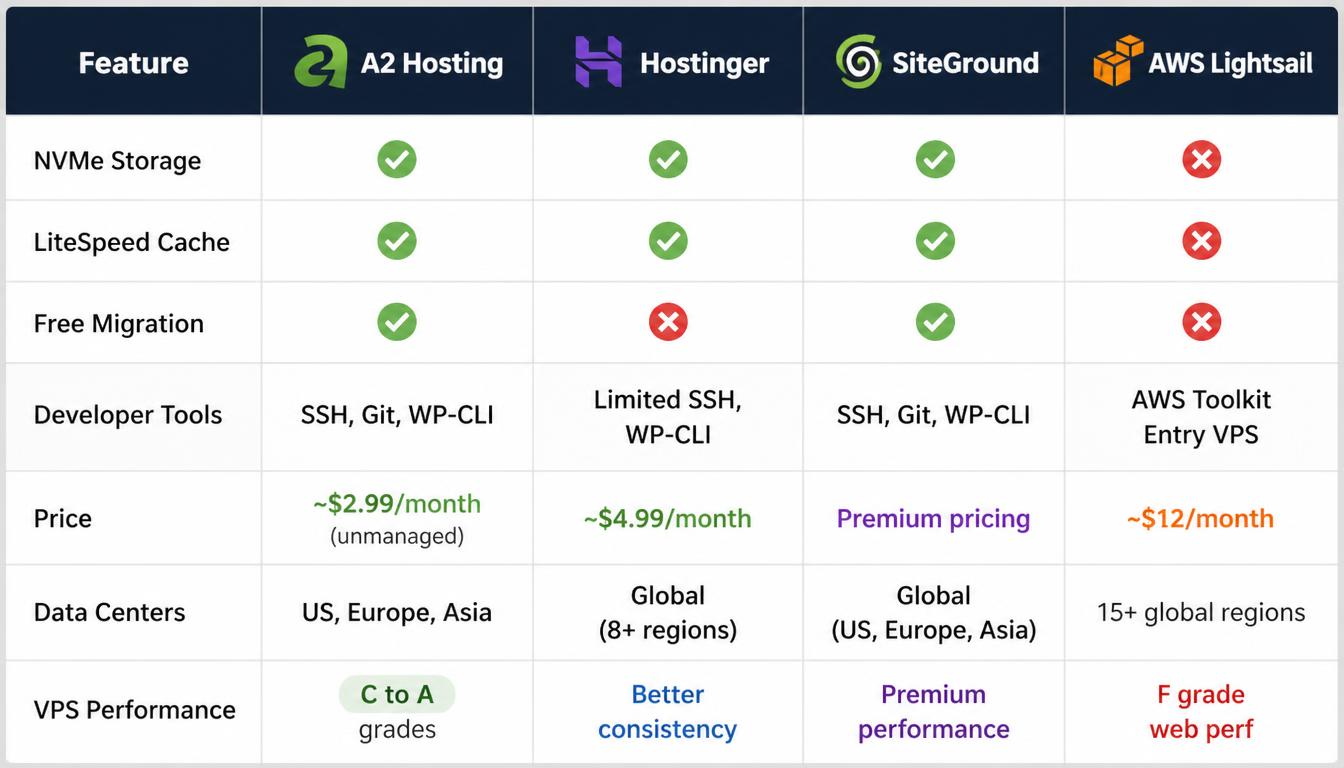
The takeaway: A2 Hosting is a strong choice for developers and speed-obsessed site owners who want control and performance without paying managed-host prices. It's a better fit for technically comfortable users than beginners.
Part 4: The Decision Framework
By now, you should have a clear understanding of what matters in web hosting. Here's how to actually make a decision.
Step 1: Clarify Your Technical Comfort
- True beginner: You want simplicity. Hand-holding. Clear guidance. A builder or managed platform might be better.
- Comfortable with cPanel: You can navigate the basics. Shared hosting from a quality provider works.
- Developer: You want SSH, Git, root access, and control. VPS or unmanaged hosting is worth the effort.
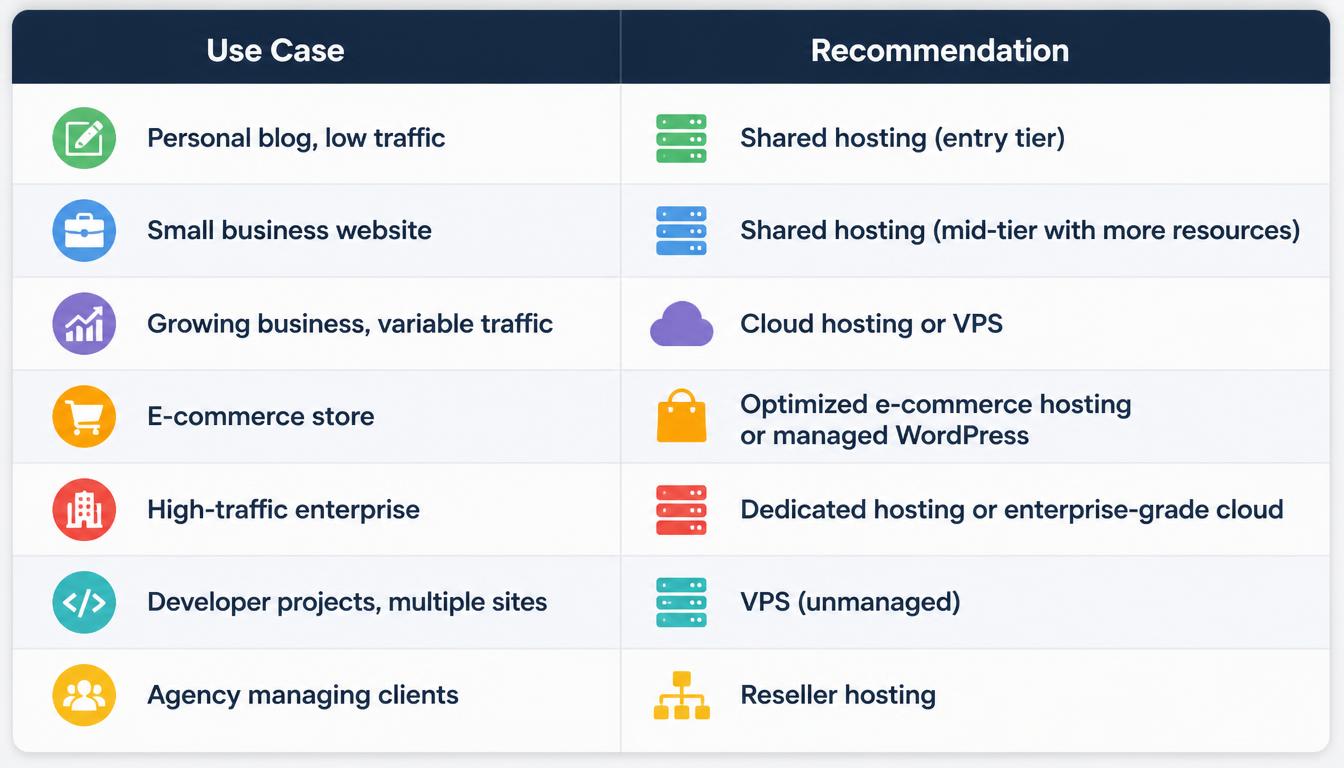
Step 2: Map Your Use Case to Hosting Type
Step 3: Evaluate Price Honestly
Calculate the total cost for the first 12 months and the next 12 months after renewal. A host that's cheap in year one but expensive in year two might not be the best value.
Step 4: Check Performance Data
Look at independent benchmark data, not marketing claims. VPS Benchmarks runs standardized tests that give you hard numbers on web performance, disk IO, CPU power, and network speeds.
Step 5: Test Support
Reach out to support before you buy. Ask a technical question about your specific use case. How quickly do they respond? Is the answer helpful? That experience is a preview of what you'll get after you're a customer.
Frequently Asked Questions
What's the difference between shared and VPS hosting?
Shared hosting means your site shares resources with hundreds of other sites. VPS gives you a guaranteed slice of resources, like having your own dedicated floor in a shared building.
How much should I expect to pay for web hosting?
Entry-level shared hosting starts around $3 - $6 per month on promotional pricing. Renewal rates are higher. VPS starts around $10â$25 per month. Dedicated hosting can exceed $100+ per month.
Do I really need "unlimited bandwidth"?
Most likely not. The limits on "unlimited" plans are almost always high enough for average websites. It's the resource limits (CPU, memory, entry processes) that matter more.
Can I move my site to a new host later?
Yes. Most hosts now offer free migration assistance. Moving is easier than it used to be, but choose a host with migration support if you're not technical.
What's the most important factor when choosing a host?
Speed and reliability matter most for user experience. But the most practical factor is understanding the actual price you'll pay after the first year. Many people choose a host based on the teaser rate and are surprised by the renewal price.
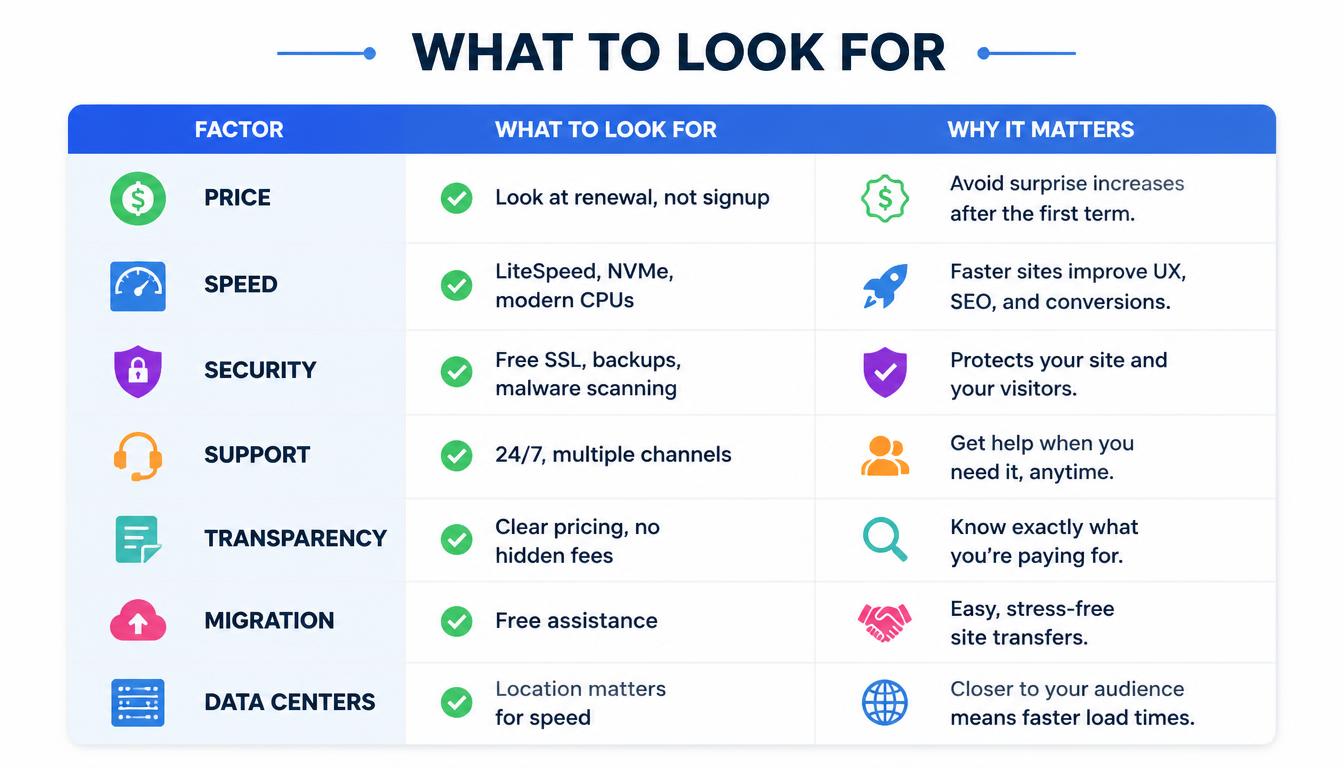
A2 Hosting fits this picture clearly: It delivers strong performance through NVMe storage and LiteSpeed caching, supports developers with SSH and Git access, and includes free migration and automated backups. The renewal pricing is steep, but for technical users who prioritize speed, it's a compelling option in the shared and VPS tiers.
If you want the fastest possible shared hosting with developer tools, A2 is one of the strongest choices available.
View A2 Hosting plans and current promotions
Disclosure: Some links in this article are affiliate links. We may earn a small commission at no extra cost to you. We only recommend products We've researched and believe bring value to my readers.


Be the first to leave a comment.