

As we all know, that invoicing is the lifeblood of any business. Without it, you don't get paid. Yet for many small and medium businesses, invoicing remains a headache, spreadsheets, manual calculations, chasing payments, and struggling to look professional.
we've been tested invoicing tools for few years, and we've seen the full spectrum, from basic PDF generators to enterprise systems that cost a fortune. Most tools fall into two camps: too simple (limited features, unprofessional templates) or too complex (steep learning curve, expensive).
Bseech Invoice Suite sits perfectly in the middle. It's powerful enough to handle complex invoicing needs but intuitive enough that anyone can use it. And it's built specifically with all businesses in mind, complete with VAT support, many revenues returns like IRS, SARS, HMRC, BZSt, DGFiP and others compliance, and local payment integrations.
In this comprehensive review, I'll break down everything you need to know: features, templates, pricing, and how it compares to other invoicing solutions.
What Is Bseech Invoice Suite?
Bseech Invoice Suite is a cloud-based invoicing platform that lets you create, customize, manage, and send professional invoices. It's part of the Bseech ecosystem, which also includes the resume builder and payroll system we've reviewed previously.
Who Is It For?
Bseech Invoice Suite is built for:
- Freelancers and solopreneurs who need professional invoices without complexity
- Small to medium businesses with 1-100 employees
- Service-based businesses (agencies, consultants, contractors)
- Businesses needing VAT-compliant tax invoices
- Anyone who wants to look professional and get paid faster
The Bseech Ecosystem
| Product | Purpose |
| Bseech Resume Builder | Professional CV creation |
| Bseech Payroll & Workforce Management | HR, payroll, and SARS compliance |
| Bseech Invoice Suite | Invoicing and payment management |
| Bseech Blog | Business strategy insights |
The invoice suite is designed to work seamlessly with the other tools, making it easy to manage your entire business from one ecosystem.
Key Features: A Complete Invoicing Solution
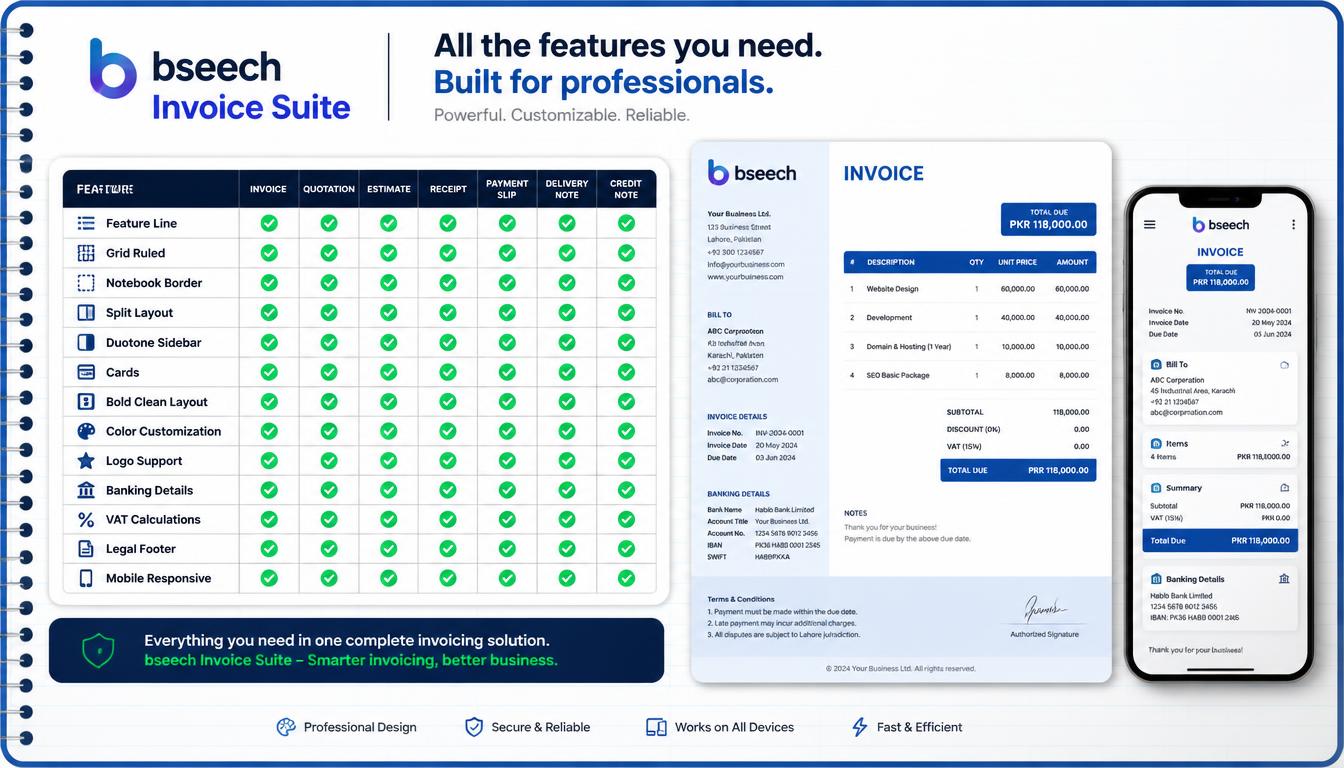
1. 8 Professional Templates
One of the standout features of Bseech Invoice Suite is the variety of professional templates. Each template is designed for a different style and industry:
| Template | Name | Best For |
| Line Grid | Clean, structured layout | Corporate and professional services |
| Ruled Notebook | Notebook-style aesthetic | Creative agencies and startups |
| Border Minimal | Clean borders and simplicity | Designers and minimalists |
| Split Asymmetric | Modern split layout | Modern businesses and creatives |
| Duotone | Bold duotone colors | Brand-focused businesses |
| Sidebar | Sidebar layout | Detailed invoices with notes |
| Card Stack | Card-style layout | Tech companies and modern brands |
| Bold Typography | Bold, striking text | Brands that want to stand out |
Each template is fully customizable with your company branding, colors, and information. You can switch between templates instantly to see which one looks best for your business.
Template Comparison
2. Company Branding & Customization
The form panel lets you customize every aspect of your invoice:
Company Information
- Company Name & Reg Number - Your business identity
- Address - Physical and postal address
- VAT Number - For collections revenue compliance
- Contact Details - Phone, email, and website
- Director/CEO - Legal representative
- Compliance Status - B-BBEE, SARS registration, etc.
Logo Upload
Upload your company logo (PNG, JPG, or SVG) to brand your invoices. The logo appears automatically on all templates.
Banking Details
Enter your banking information for easy payment:
- Bank Name
- Branch Code
- Account Holder
- Account Number
- Account Type (Current, Savings, Business, Cheque)
- SWIFT/BIC Code
- IBAN (optional)
- Payment Reference
Legal Footer
The legal footer includes:
- Director/CEO information
- Compliance and vendor status
- Contact email and phone for queries
- Revenues registration details
3. Client Management
The client management feature lets you save and reuse client information:
What You Can Store
- Client Name
- VAT Number
- Email Address
- Phone Number
- Physical Address
How It Works
- Select from dropdown - Choose an existing client
- Auto-fill - Client details populate automatically
- Add New Client - Save new clients for future use
- Search - Find clients quickly by name
This saves significant time when sending recurring invoices to regular clients.
4. Line Items & Pricing
The items editor makes it easy to add products or services:
Item Fields
- Description - What you're billing for
- Quantity - Number of units
- Unit Price - Price per unit (VAT inclusive)
Automatic Calculations
- Subtotal - Sum of all items (excl. VAT)
- VAT - Calculated at your chosen rate
- Total - Subtotal + VAT
- Per-item VAT - Shows VAT per line item
Price Display
Each item shows:
- Price including VAT
- Price excluding VAT (calculated automatically)
- VAT amount per item
5. VAT & Currency Support
Bseech Invoice Suite is built for All businesses with full VAT support:
VAT Features
- Customizable VAT Rate - Set any percentage (default 15%)
- Automatic VAT Calculation - Calculated on each item
- VAT Inclusive Pricing - Enter prices including VAT
- VAT Summary - Shows total VAT on the invoice
Currency Support
| Currency | Symbol | Code |
| South African Rand | R | ZAR |
| US Dollar | $ | USD |
| Euro | ⬠| EUR |
| British Pound | £ | GBP |
6. Invoice Management
The invoice management system lets you organize and track all your invoices:
Invoice Status Tracking
| Status | Description |
| Unpaid | Invoice sent but not paid |
| Pending | Payment in progress |
| Paid | Invoice settled |
| Overdue | Payment past due date |
| Cancelled | Invoice voided |
Features
- Search - Find invoices by number or client
- Filter - Filter by status
- Stats Dashboard - Shows total, paid, unpaid, and pending counts
- Quick Actions - Mark as paid, view details, delete
Payment Tracking
When you mark an invoice as paid, you can record:
- Payment method (Bank Transfer, Credit Card, Paystack, Cash, Cheque, Other)
- Payment reference/transaction ID
- Payment amount
- Payment date
- Notes
7. Paystack Payment Integration
Bseech Invoice Suite includes Paystack integration for online payments:
How It Works
- Generate Invoice - Create your invoice
- Client Receives Invoice - With payment link
- Client Clicks "Pay Now" - Opens Paystack payment page
- Secure Payment - Paystack handles the transaction
- Automatic Status Update - Invoice marked as paid
Payment Methods Supported
- Credit Card (Visa, Mastercard, Amex)
- Bank Transfer
- Mobile Money
- QR Code Payments
Security
- PCI Compliant - Paystack handles all sensitive data
- Secure Payment Page - Hosted by Paystack
- No Card Data Stored - All payment data handled by Paystack
- SSL Encryption - All data encrypted
8. PDF Export & Sharing
Share invoices professionally with multiple export options:
PDF Export
- High Quality - Print-ready PDFs
- Multiple Pages - Handles long invoices
- Logo Included - Your branding preserved
- Legal Footer - All compliance information included
Sharing Options
| PDF Download | Download as PDF file |
| Share via WhatsApp with message | |
| Send via email with attachment | |
| Share Link | Copy invoice link to clipboard |
| Preview | View before sending |
9. Invoice Preview
The real-time preview shows your invoice as you build it:
What You See
- Live Preview - Updates as you type
- Template Preview - See each template in action
- Print Preview - See how it will look printed
- Mobile Preview - Responsive design preview
Preview Modal
- Full Screen View - See the complete invoice
- Zoom in/out - Check details
- Close to Continue - Return to editing
10. Trial & Subscription Model
Bseech Invoice Suite uses a generous trial model:
Trial Features
- 5 Free Invoices - Create up to 5 invoices during trial
- 14-Day Trial - Full access to all features
- No Credit Card Required - Start free
- All Templates Included - All 8 templates available
- All Features Unlocked - Full functionality during trial
Subscription Plans
| Plan | Price | Features |
| Free Trial | $0 | 5 invoices, 14 days, all features |
| Monthly | $18/month | Unlimited invoices, all features |
| Annual | $187/year | Unlimited invoices, all features, 2 months free |
User Experience & Interface
Design Philosophy
Bseech Invoice Suite follows a clean, modern design philosophy:
- Minimalist - No clutter, focus on what matters
- Intuitive - Everything is where you expect it
- Responsive - Works on all devices
- Professional - Designed to impress clients
Navigation
The interface is organized into logical sections:
- Top Bar - Logo, user info, trial status, actions
- Template Bar - Quick template switching
- Form Panel - All customization options
- Preview Panel - Live invoice preview
- Saved Invoices - Access to your history
Mobile Responsiveness
The suite is fully responsive and works on
- Desktop computers
- Laptops
- Tablets
- Mobile phones
The mobile interface is optimized for touch interaction, making it easy to create invoices on the go.
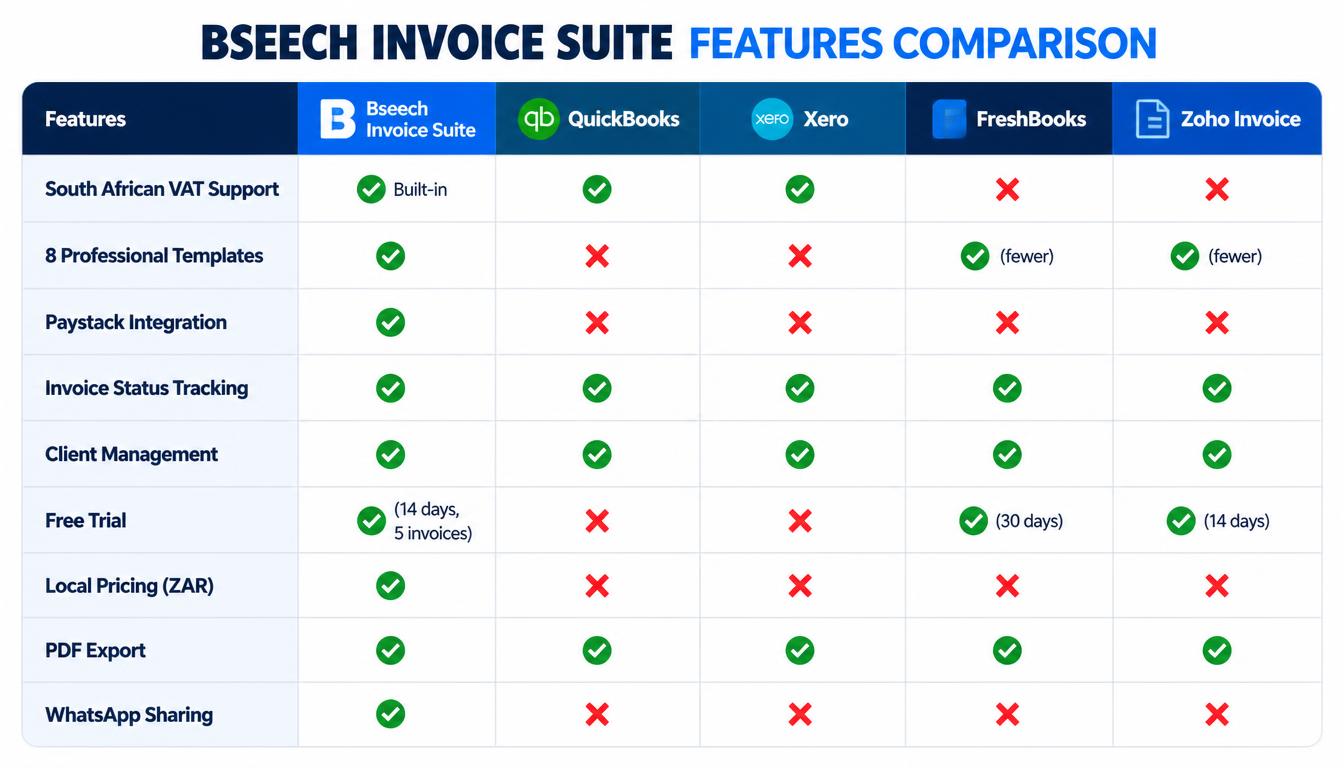
Bseech Invoice Suite vs Competitors
Bseech vs QuickBooks
QuickBooks wins on: Accounting integration, bank reconciliation, expense tracking.
Bseech wins on: All VAT support, Paystack integration, professional templates, simpler pricing, local support.
Bseech vs Xero
Xero wins on: Comprehensive accounting features, extensive integrations, global reach.
Bseech wins on: All business features, simpler learning curve, professional templates, WhatsApp sharing.
Bseech vs FreshBooks
FreshBooks wins on: Time tracking, project management, mobile app.
Bseech wins on: Revenues VAT support, Paystack integration, more templates, local pricing.
How to Create an Invoice in 5 Minutes
Step 1: Log In or Start Trial
Sign up for a free account or log in to your existing account. No credit card required for the trial.
Step 2: Choose a Template
Select from 8 professional templates. Your preview updates instantly.
Step 3: Enter Company Details
Fill in your company information, logo, and banking details. These can be saved for future use.
Step 4: Add Client Information
Select an existing client or add a new one.
Step 5: Add Line Items
Enter your products or services with quantities and prices.
Step 6: Set Dates and Details
Add invoice number, date, due date, and PO number.
Step 7: Preview and Send
Review your invoice in the live preview, then download as PDF or share via WhatsApp/email.
Who Should Use Bseech Invoice Suite?
Buy Bseech Invoice Suite If:
- You're a business owner, freelancer or a solopreneur
- You need VAT-compliant tax invoices
- You want professional, customizable templates
- You need client management and tracking
- You want online payment integration
- You value a modern, intuitive interface
- You want local pricing and support
Skip Bseech Invoice Suite If:
- You need complex accounting features
- You need multi-currency invoicing beyond the 4 supported currencies
- You require extensive third-party integrations
Pros and Cons
Pros
- All busness VAT compliance - Built for most requirements
- 8 professional templates - More variety than competitors
- Paystack integration - Easy online payments
- Real-time preview - See changes instantly
- Client management - Save and reuse client data
- Invoice status tracking - Know what's paid and what's not
- Multiple sharing options - PDF, WhatsApp, email
- Free trial - 14 days, 5 invoices, no credit card
- Modern interface - Clean and intuitive
- Mobile responsive - Works on all devices
Cons
- No complex accounting - Not a full accounting suite
- Fewer integrations - Growing ecosystem
Bseech Invoice Suite is an excellent invoicing solution for all businesses. It combines professional design, compliance, and modern features in a user-friendly package.
The 8 templates give you more variety than most competitors. The VAT support ensures you're always compliant. The Paystack integration makes getting paid faster. And the free trial lets you test everything before committing.
For freelancers, agencies, consultants, and small to medium businesses, Bseech Invoice Suite is a solid choice that will help you look more professional and get paid faster.
Frequently Asked Questions
Does it support Paystack payments?
Yes. Bseech Invoice Suite integrates with Paystack for online payments. Clients can pay via credit card, bank transfer, or mobile money.
Can I use my own logo?
Yes. Upload your company logo in PNG, JPG, or SVG format. It appears automatically on all templates.
How many templates are available?
There are 8 professional templates: Line Grid, Ruled Notebook, Border Minimal, Split Asymmetric, Duotone, Sidebar, Card Stack, and Bold Typography.
Is there a free trial?
Yes. You get 14 days and 5 invoices for free. No credit card required.
Can I save client information?
Yes. Save client details for reuse. The system stores client name, address, VAT number, email, and phone.
Can I send invoices via WhatsApp?
Yes. You can share invoices via WhatsApp with a pre-populated message and PDF attachment.
What currencies are supported?
Bseech Invoice Suite supports ZAR (South African Rand), USD (US Dollar), EUR (Euro), and GBP (British Pound).
Is there a mobile app?
Currently, Bseech Invoice Suite is web-based but fully responsive on mobile devices.



Be the first to leave a comment.